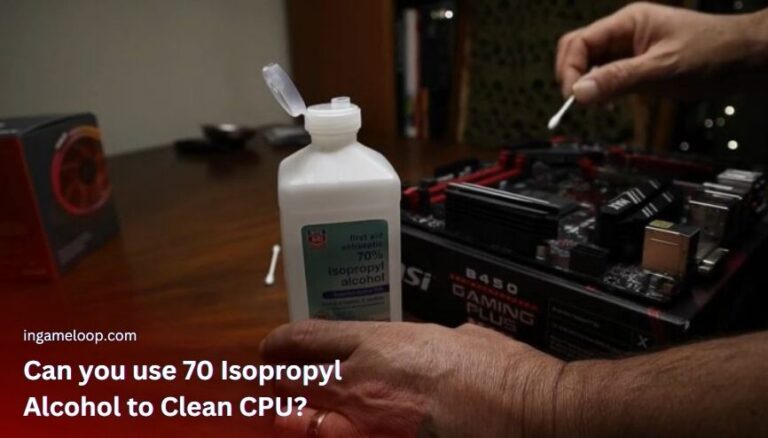
You can use plain 70% isopropyl alcohol to clean a CPU's metal heat spreader, but 90% or higher is the better default for removing thermal paste. Use a lightly dampened lint-free wipe, keep liquid away from the socket, and let the surfaces dry completely before reassembly.
That answer applies to the exposed metal lid on a conventional desktop processor. It is not permission to spray the motherboard, wash a processor, or scrub its pins. If you are choosing supplies now, Corsair's CPU-cleaning instructions recommend 90% or higher isopropyl alcohol.
What the alcohol percentage actually tells you
Isopropyl alcohol, also called IPA or isopropanol, is a solvent. The percentage describes its concentration; the remaining ingredients matter too. A bottle labeled “rubbing alcohol” can contain ingredients that you do not want left between the processor and cooler.
Read the complete label. For this job, choose plain IPA and water without fragrance, coloring, oils, or skin conditioners. An electronics-cleaning product with an identified formulation is easier to assess than a mixed household cleaner.
Chemtronics sells electronics-grade 70% and 91% IPA wipes. That establishes that 70% IPA is not inherently incompatible with every electronic application. It does not establish that any drugstore alcohol is suitable for every CPU surface.
| What you have | Practical decision |
|---|---|
| Plain 90–99% IPA | Preferred general choice for thermal-paste residue on an exposed heat spreader, subject to the component's instructions |
| Plain 70% IPA | Can clean the metal lid, but introduces more water; use sparingly and verify complete drying |
| A thermal-paste cleaning wipe | Follow its specified uses and handling instructions |
| Scented rubbing alcohol or hand sanitizer | Do not use for this procedure |
| An unidentified cleaner | Obtain a suitable product before proceeding |
Do not dilute 70% IPA further. Adding water does not protect the processor or improve this cleaning procedure. The task is removing grease and paste, so disinfection advice about contact time is not the right guide.
Prepare the PC and identify the surface
Shut down the computer, switch off the power supply where applicable, and unplug it. Work with the system cool enough to handle, on a clean surface with appropriate protection against electrostatic discharge. Keep alcohol away from ignition sources and follow its ventilation instructions.
Remove the cooler using its manual. Leave the CPU secured in its socket when the mounting arrangement allows you to clean the lid without removing it. If a cooler is stuck, stop pulling and consult the release procedure; a forced lift can damage the assembly. The separate thermal-paste removal guide explains this stage in more detail.
Before wiping, distinguish these parts:
- The integrated heat spreader, or IHS, is the metal CPU lid that contacts the cooler through thermal paste.
- The cooler base is the mating surface; it needs cleaning too when you replace paste.
- The socket, pins, and contact pads provide electrical connections. Treat contamination here as a separate repair problem.
- An exposed silicon die, common in some other device designs, needs the device's own service procedure.
Do not remove the heat spreader or open a sealed liquid cooler to clean ordinary thermal paste.
Clean the lid without spreading liquid
- Gather clean, lint-free wipes and the replacement thermal paste or specified thermal interface material. Put the alcohol bottle where an accidental knock cannot spill it onto the PC.
- Gently lift off the bulk of the old paste with a clean wipe. Fold or replace the wipe as it becomes dirty instead of smearing the same material around.
- Lightly moisten a fresh section with IPA away from the motherboard. It should not drip. Never spray or pour alcohol directly onto the CPU.
- Wipe the remaining residue from the metal lid with light pressure. Work carefully near the edges so paste does not collect around the socket or surrounding components.
- Clean the cooler's contact surface with a separate clean section. Inspect both surfaces under good light for paste, fibers, and liquid.
Intel's thermal interface material instructions likewise specify applying IPA with a suitable wiper and allowing it to dissipate before installation. Concentration does not replace careful handling.
How long should it dry?
There is no fixed drying time that guarantees safety for every amount of liquid, room condition, and surface. Wait until the cleaned surfaces are completely dry before applying paste or reinstalling the cooler. A dry-looking lid does not prove that liquid trapped underneath a component has evaporated.
If alcohol ran into the socket or under the processor, leave the system disconnected. Do not start the PC to “help it dry,” and do not apply a hair dryer or other heat source around solvent. Have the affected area inspected using the relevant manufacturer's service guidance.
When the assembly is clean and dry, apply fresh thermal interface material as directed for your CPU and cooler. Secure the cooler and reconnect its fan and pump connections as required. After startup, check the CPU temperature and stop the test if it rises rapidly toward the processor's limit.
Alternatives when the bottle is unsuitable
A manufacturer-approved thermal-paste cleaner or wipe is a reasonable alternative. Some compounds also permit dry removal: Noctua's cleaning guidance describes using a dry lint-free tissue, with IPA or its cleaning wipes for residue. Follow the instructions for the compound you actually have.
Do not substitute vinegar, soap and water, nail-polish remover, or a generic aerosol simply because it dissolves grease. You also do not need to disassemble a healthy cooler on a regular schedule to disinfect the CPU. If temperatures are the concern, start with diagnosing and reducing CPU temperature.
Frequently asked questions
Is 99% alcohol too strong for the CPU lid?
No. High-concentration IPA is commonly specified for this kind of cleaning. Surface compatibility, additives, liquid control, and drying matter; “stronger than 70%” is not a general damage threshold.
Can I use an alcohol preparation pad?
Check its ingredients and material first. A skin-preparation pad is not automatically an electronics wipe. Avoid added conditioners and anything that leaves lint or residue.
Will using 70% alcohol improve cooling less than 99%?
The solvent is removed before use. The relevant result is a clean, dry interface and a correctly mounted cooler with suitable thermal material—not the percentage printed on the bottle after cleaning is finished.
For a planned repaste, obtain suitable supplies first. Careful wiping of the exposed contact surfaces is the useful work; adding water or flooding the assembly creates extra problems.